The more complex the product and the more teams working on it, the more visible the role of design infrastructure becomes. It's not about beautiful components or unified style for its own sake — it's about how hundreds of designers and engineers make thousands of decisions per day in a way that adds up to a coherent whole instead of drifting apart. The rise of AI agents opens a new window here: infrastructure processes that used to require entire teams and dedicated budgets can now be built differently — faster, with less overhead, and in real time. In this article I'll focus on Core Platform as part of design infrastructure and on how AI agents fit into its various layers.
Imagine a company with several product teams. Buttons across different products look similar, but not identical. Spacing drifts by four pixels. The error message in the banking tab is written in a different tone than the one in the crypto tab. Nobody broke it on purpose — there was just no mechanism holding everything together.
Who is responsible for making sure all teams speak the same language? Core Platform.
What Is Core Platform
[1]Core Platform is design infrastructure. Not a product team and not a UI kit in Figma. Which shade of red means an error. What spacing is standard for cards. What an empty screen looks like. How navigation is structured in a large application. If every team makes these decisions independently — you spend resources repeatedly, end up with a set of different answers, and build a product that doesn't feel like a unified whole.
Core Platform answers one question: what is our shared vocabulary?
Three Layers of the System
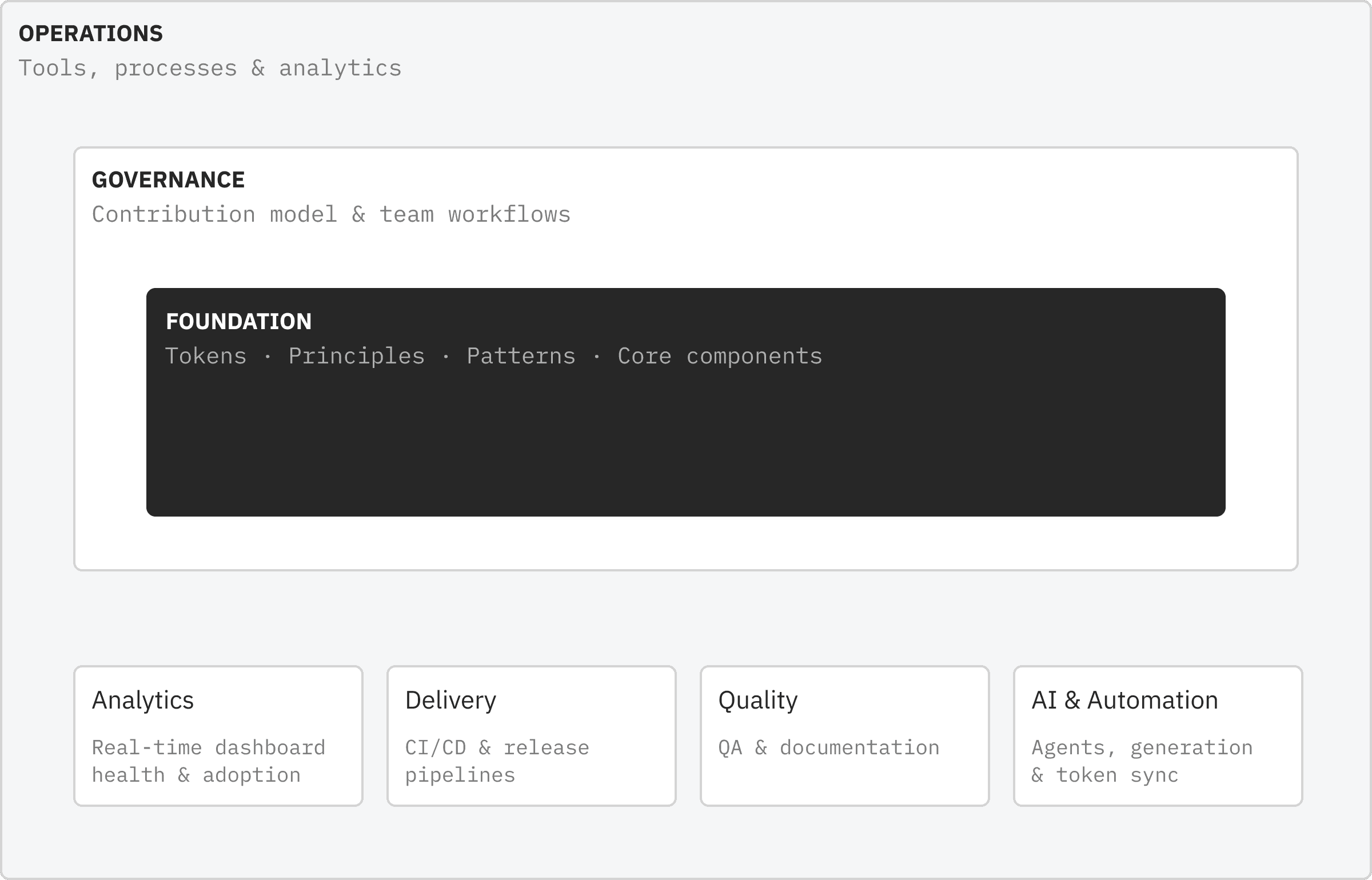
[2]The system is built in three layers, each solving a different problem.
Tokens are the system level. Atomic variables: colors, typography, spacing, radii, shadows, animations. No arbitrary hex values. No spacing outside the scale. There is no flexibility at this level — a token is either from the system or it isn't. This isn't rigidity for its own sake; it's a way to make drift visible. If a team uses #1A73E8 instead of color.brand.primary — that's not an aesthetic question, it's a signal that something went wrong.
Components are the configuration level. Reusable building blocks with variants, sizes, and states. There is flexibility here — but within defined boundaries. A component can be configured, not broken. A button can be primary or destructive, large or small, with an icon or without — but it remains a system button with predictable behavior.
Patterns are the intent level. Here we document not "what" but "why." How onboarding is structured. How validation errors work. How the system behaves when the connection is lost. Patterns allow adaptation — but only with a rationale that gets recorded. iOS feels like iOS, Android feels like Android, but both are unmistakably the same product.
The principle that unifies all three layers: the system should make the right thing easy and the wrong thing visible.
What Goes Into the System
[3]Before talking about how the system works — it's worth saying something about how it gets populated.
There's a simple rule: if three or more teams independently solve the same problem, the solution belongs to the system. Everything before that is premature abstraction. You don't yet know the real requirements because you haven't seen the problem in three different contexts.
There is a second filter too: impact on trust across products. Navigation, authentication, errors, empty screens — they appear everywhere. A poorly written error message in one product undermines trust in another. That's no longer a team problem — it's a platform problem.
The platform sets the grammar. Teams write the sentences.
Governance — The Most Underrated Part
[4]The three-layer model is a structure. But structure without governance is dead.
A design system without a governance model is a UI kit that gets used for the first six months and then quietly gets bypassed. This isn't a hypothesis — it's the story of most design systems that never made it to version 2.0.
Governance answers three questions: who can override a system decision, under what conditions, and through what process? Without answers to those, there's no system — just a set of recommendations people follow as long as it's convenient.
In practice this looks like an RFC process (Request for Comments) for new components, clear criteria for acceptance and rejection, and a champions program — engaged representatives in each product team who translate between the platform's language and their product's language.
But there's a problem: the larger the company, the harder governance is to run manually. With twenty teams, no one can physically track what's happening with every component, every token, every pattern. That's exactly where AI agents come in.
When the Platform Starts Thinking
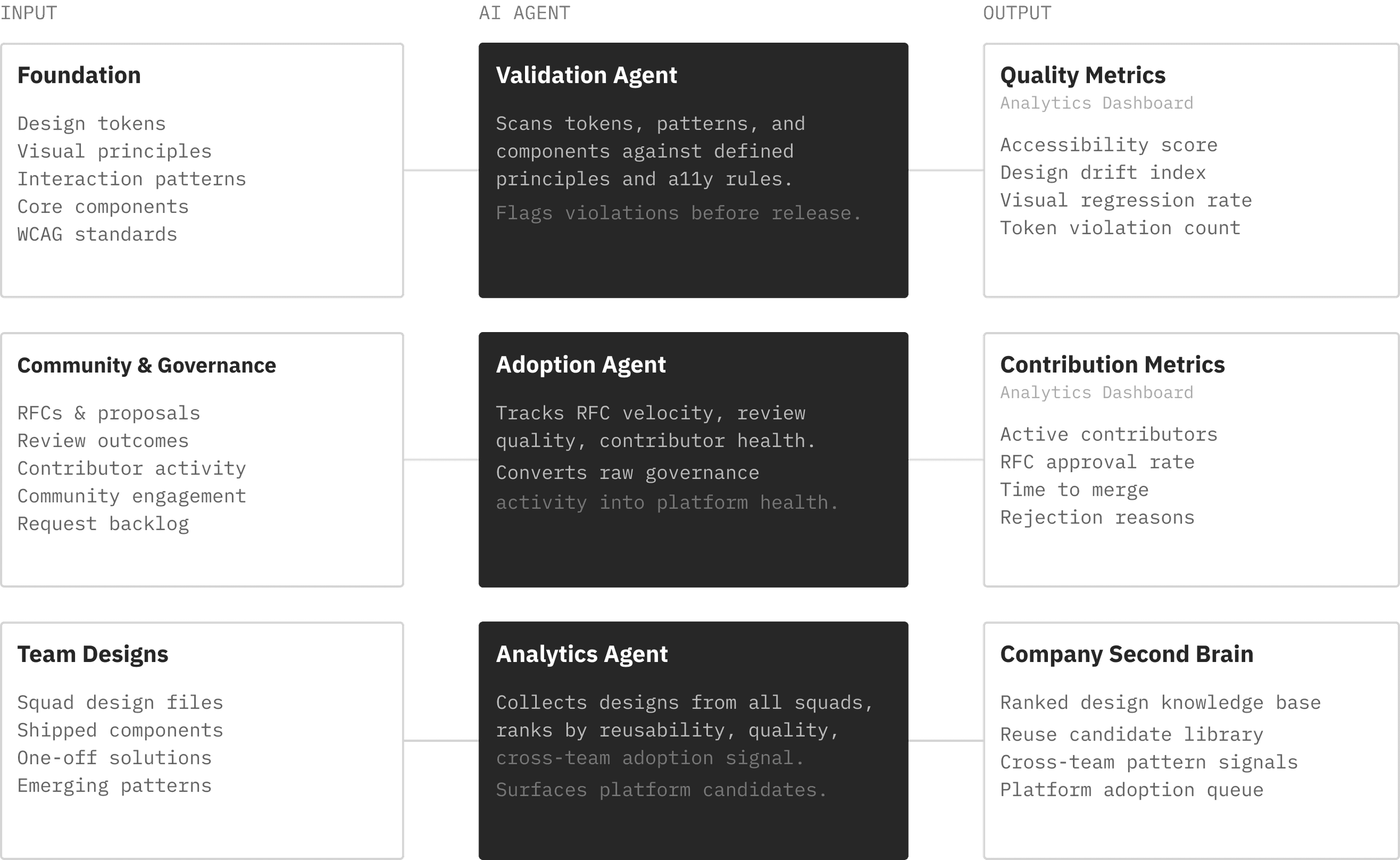
[5]The operations layer of the platform is responsible for keeping the system running in real time: CI/CD for components, documentation, quality, analytics. This is the layer where three agents live — agents that change how the platform governs itself.
The idea isn't to replace people. The idea is to give the platform the ability to see itself — continuously, not just during audits.
The Validation Agent
The first agent works like an intelligent linter for the Foundation layer. Its job is to continuously scan all incoming artifacts — design files, pull requests, released code — for compliance with tokens, principles, and core components.
When a discrepancy is found, the agent doesn't just log it — it blocks the incoming artifact and generates a report: exactly where the violation is, which token should have been used, which component is the correct equivalent. This isn't a quarterly post-mortem review — it's a gate at the entry point.
The same agent becomes the entry point for implementation questions. A team wants to add a new component? The agent checks whether an equivalent already exists in the system, evaluates compliance with principles, and provides concrete implementation recommendations.
The practical effect: teams stop finding out about mistakes six months later in a review. They find out immediately.
The Adoption Agent
The second agent works at the level of new components — those that don't yet exist in the Foundation. Its work begins where the first agent says "this component isn't in the system."
The agent validates the new component: produces a brief summary of what it is, describes how it differs from existing system elements, and evaluates its novelty. After that, the component goes into a dedicated inbox — not rejected and not accepted immediately, but placed under observation.
As the component appears across multiple teams, the agent tracks this. When the threshold is crossed — three independent uses — a notification is generated: depending on the parameters of cross-team interaction, it goes to champions from different teams, platform designers, and architecture engineers.
Along with the notification comes data: how the component is being used, in what contexts, with what variations. This isn't a request into a void — it's a proposal with an evidence base.
The adoption agent is the mechanism that makes the contribution model alive. It turns informal patterns into visible signals, and visible signals into reasons for decisions.
The Analytics Agent
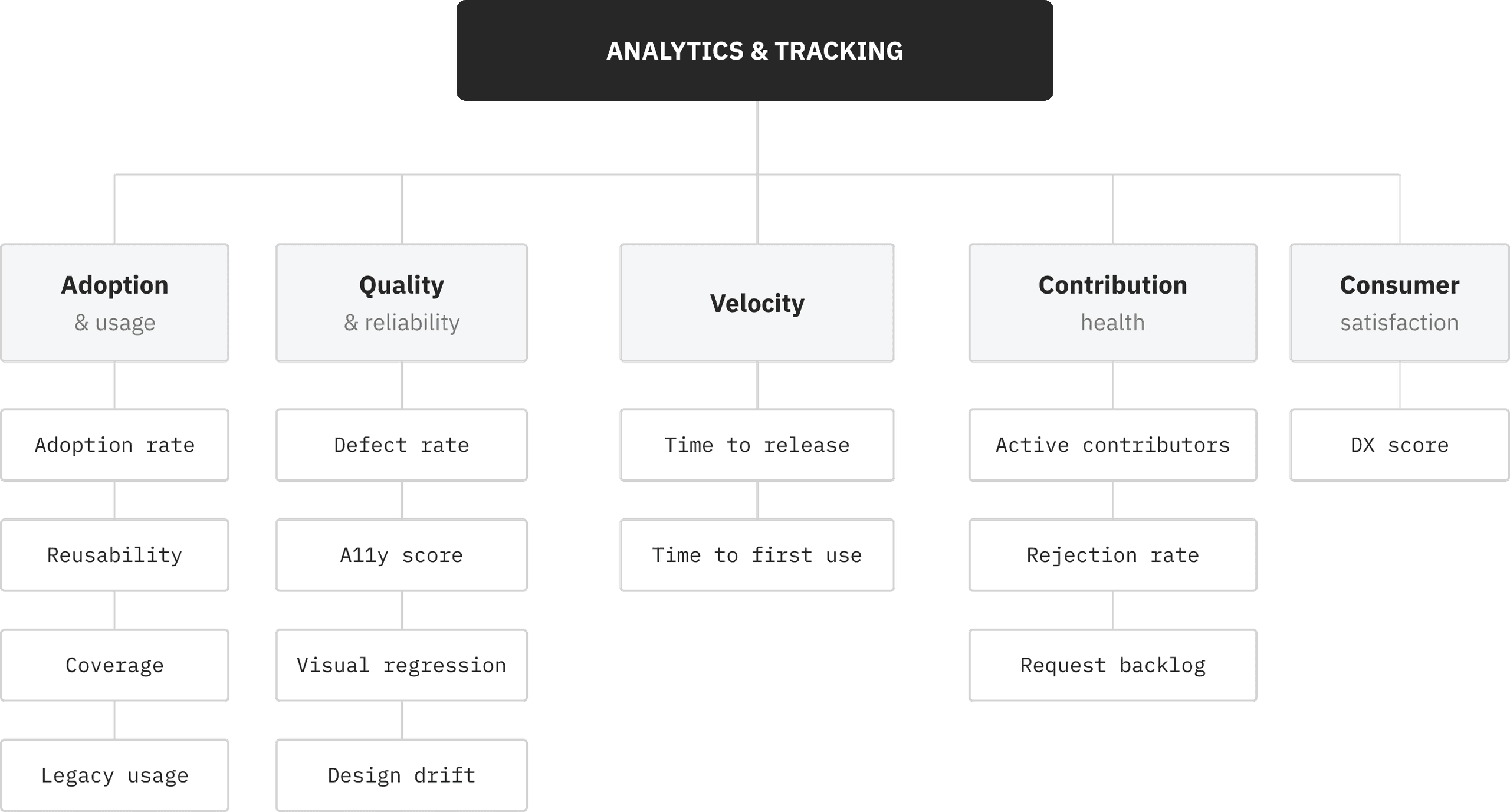
The third agent assembles the overall picture of platform health. It aggregates data from all sources: how often system components are used, what percentage of new UI is built on the platform, how quickly teams adopt new components, what the quality of contribution requests looks like.
Where possible, the agent also collects end-user data: how accessibility metrics change, where visual drift accumulates across products.
But most importantly — it doesn't just store this data. It publishes it.
Regular digests to company channels: the top 5 most-used components this quarter, new components in the inbox, teams with the highest adoption rate, changes in quality metrics. Announcements of new components that completed the contribution process. Retrospective reports — what changed in the system over the past six months.
This makes the platform visible to the whole company — not just to those who work with it daily. Leadership sees the metrics. Teams see their standing relative to others. The platform team sees where problems are accumulating before they become crises.
The analytics agent is the platform's voice.
Dashboard: Transparency as Infrastructure
[6]The work of all three agents converges in one place — the platform dashboard.
The dashboard isn't a report you look at once a month. It's a real-time operational interface: adoption rate by team, the adoption agent's inbox queue, latest violations from the validation agent, fresh analytics digests.
The key property is transparency. Any team can see how it interacts with the platform relative to others. Which system components are used the most. What's stuck in the contribution pipeline and why. Where technical drift is accumulating.
Transparency here isn't a pressure tool — it's an orientation tool. A team that sees its adoption rate can make an informed decision about whether it's worth optimizing. A platform team that sees the rejection rate of contribution requests can fix its review process.
This is governance that scales. Not rules enforced manually, but visibility that makes the right decisions obvious.
Why This Matters Now
[7]Design systems have gone through several evolutionary stages. First came style guides — documentation you read. Then UI kits — component libraries you plugged in. Then systems with governance — structures with rules and processes.
The next step is platforms with active intelligence. Not passive libraries waiting to be used, but running processes that validate, observe, analyze, and communicate continuously.
This isn't futurism. Lint checks in design files exist today — Figma Tokens, Style Dictionary, design lint plugins. Contribution pipelines with automated validation too. AI that analyzes usage patterns is a matter of integration, not invention.
The difference is whether you see this as a set of separate tools or as a connected system with roles and data flows.
Today's level of agent capabilities makes it possible to automate a large portion of the routine work that used to require dedicated hires. The analyst who compiles metrics once a month. The reviewer who checks standards compliance before a release. The editor who publishes digests for teams. These aren't bad roles — it's just that they can now run continuously, without delays, and return results in real time. A team makes decisions based on data from this morning, not three weeks ago. The platform sees itself — and those who manage it see it too.
If you're building a product with multiple teams and thinking about the platform layer — the question isn't whether you need agents. The question is how long you can scale governance manually before it starts working against you.